Dataset Access Through APIs
Forest Stack provides a powerful set of APIs that allow developers, analysts, and automated systems to programmatically access datasets. These APIs enable seamless integration of Forest Stack data into applications, workflows, dashboards, and analytical pipelines—without relying on the web interface.
Introduction
The Dataset Access API allows external systems to retrieve dataset metadata, query structured information, access the latest records, and download dataset files. It is designed for automated, scalable, and reliable machine-to-machine integration.
What the API Does
- Retrieves dataset metadata such as title, description, provider, tags, and update history
- Fetches full dataset content or filtered subsets
- Returns the most recent dataset entries
- Allows downloading dataset files in supported formats
Who Should Use It
- Developers integrating datasets into applications
- Data analysts and scientists automating ingestion workflows
- AI/ML teams requiring structured datasets for modelling
- Government dashboards and enterprises needing scheduled data refresh
- Automation systems performing periodic or event-driven access
How It Relates to Forest Stack Datasets
Every dataset, Open or Restricted has a corresponding API endpoint. APIs provide:
- Faster automated access
- Structured and consistent output
- Support for batch, scheduled, or real-time processing
Access Requirements
API Keys (Client Credentials)
To use Forest Stack APIs, users must generate Client Credentials:
My Profile → Account Settings → Client Credentials
Roles determine dataset access:
- Consumers → Access Open datasets
- Providers → Access datasets they upload
- Organisation Managers → Access organisation datasets
- Platform Administrators → Full access
Open vs Restricted Datasets
- Open datasets → Accessible immediately
- Restricted datasets → Require approval
Authentication Flow
Before calling any dataset API, users must generate an authentication token.
Step 1: Generate Client Credentials
From the user dashboard:
- Go to My Profile → Account Settings
- Select Client Credentials
- Generate a Client ID and Client Secret
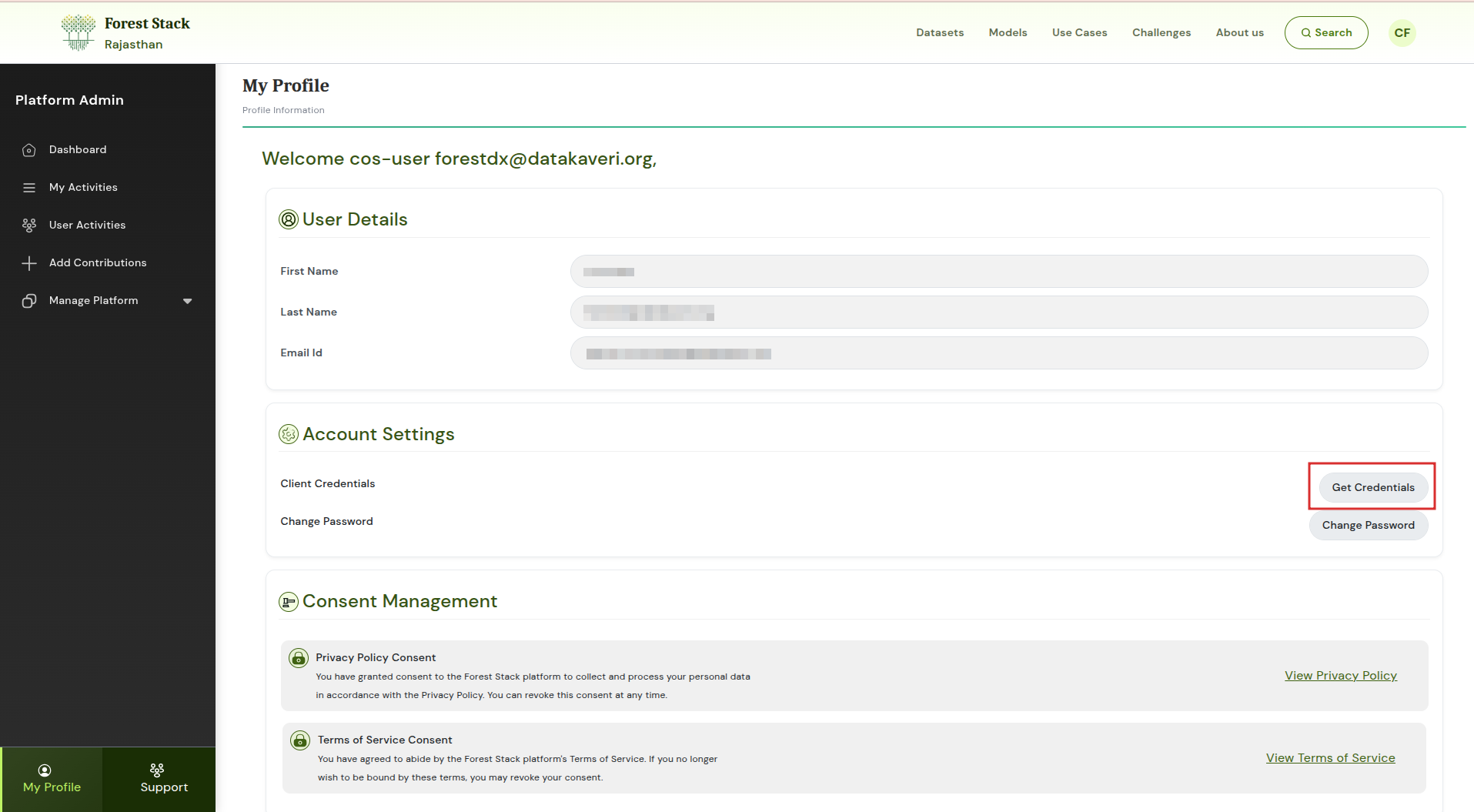
Click on Get Credentials to download the credentials
Step 2: Request an Authentication Token
Use the client ID and secret to request a token:
curl --location --request POST "https://controlplane.forest-stack.digivan.forest.rajasthan.gov.in/iudx/v2/auth/token"
--header "clientId: <CLIENT_ID>"
--header "clientSecret: <CLIENT_SECRET>"
A valid token must be included in the Authorization header for all API requests.
Optional params During Token Generation
| Key | Location | Purpose |
|---|---|---|
| delegationId | Header | Used only for delegated access requests |
| itemId | RequestBody | Required when requesting dataset-specific access tokens |
Available Dataset APIs
1. List Datasets
Retrieve available datasets with optional filters.
curl "https://controlplane.forest-stack.digivan.forest.rajasthan.gov.in/iudx/v2/cat/search?sort=name:asc;itemCreatedAt:asc;&page=1&size=10000"
-H "Authorization: Bearer <YOUR_ACCESS_TOKEN>"
-H "Content-Type: application/json"
--data '{
"searchCriteria": [
{
"searchType": "term",
"field": "type",
"values": ["adex:DataBank"]
}
]
}'
2. Get Dataset Metadata
Fetch detailed metadata for a dataset.
ITEM_ID="<item-id-here>"

curl "https://controlplane.forest-stack.digivan.forest.rajasthan.gov.in/iudx/v2/cat/item?id=$ITEM_ID"
-H "Authorization: Bearer <YOUR_ACCESS_TOKEN>"
-H "Accept: application/json"
3. Query Dataset Records
Query structured data using search filters.
curl "https://controlplane.forest-stack.digivan.forest.rajasthan.gov.in/iudx/v2/cat/search?sort=name:asc;itemCreatedAt:asc;&page=1&size=10000"
-H "Authorization: Bearer <YOUR_ACCESS_TOKEN>"
-H "Content-Type: application/json"
--data '{
"searchCriteria": [
{
"searchType": "term",
"field": "type",
"values": ["adex:DataBank"]
},
{
"searchType": "term",
"field": "tags",
"values": ["rajasthan", "species"]
}
]
}'
More API endpoint can be found here